




Experts at work
Our highly qualified Matrix developers and consultants will be happy to assist you with the implementation of our existing widgets or with the creation of your new element extension idea.
Widgets support visualizations, events, meetings, processes, collaboration in customer service, structured service requests in service rooms with bots, etc.

Here are the widgets in our NeoToolSuite.
Our tools are free to use for private purposes. For commercial use and on-premise hosting, please contact our support.
NeoBoard is available as both a standalone application and a widget within Element Web. Boards are compatible between both applications and can be edited with Element and Widget as well as with the standalone application.
The standalone application offers a dashboard for all boards and provides even easier access to them.
Possibilities:
Formats:
The code is on GitHub.

A BarCamp is an open workshop format designed for collaborative decision-making without a fixed agenda. Participants contribute their own topics, add them to the agenda, and discuss them in sessions. This format’s agenda consists of time slots that either include everyone or allow topics to be worked on in parallel by small groups. Participants are free to decide which topics they want to work on.
NeoBarCamp offers an online session planner that can be used to conduct live online BarCamps. It supports participants and moderators. All sessions, communications, and video rooms are planned in the session planner. The planner is available as an agenda, room, and link plan throughout the BarCamp. After the BarCamp, all information is documented in the session planner and in the virtual session rooms because each session is given its own room. If, for example, a NeoBoard is used there, the visualized results of the session remain there. The message communication in the message room is also retained.
The code is on GitHub.

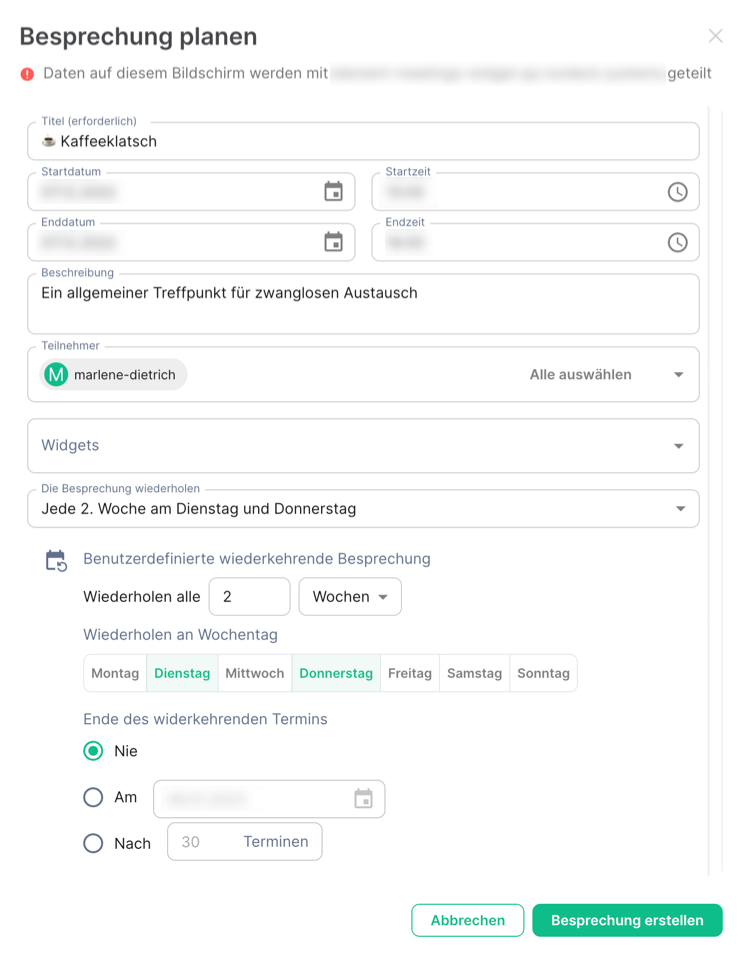
Welcome to the heart of the NeoToolSuite: NeoDateFix. It allows you to schedule meetings in Element Messenger and integrate all the necessary widgets. This gives you a solution that enables you to:
All of these functions can be added to your meetings and used during them, either in combination or individually, as needed, with full control over your data.
The code is on GitHub.

With NeoChoice, you can create versatile polls for a wide range of situations right in your Element Messenger. Use it to create simple, personalized polls. With the group widget, you can also make group memberships visible in the poll and the results (e.g., for school classes, parties, etc.).
You can choose from two types of voting:
In addition, you can choose which response type you want to use for the vote. The following options are available:
As the moderator, you plan the agenda items and upcoming votes for the meeting in advance. During the meeting, you then start the time-limited live vote.
As a participant in a vote, you will see the time remaining for the vote.
Regardless of the type of vote, after it has been conducted, you will receive a results document as a PDF file containing the following information:
The code is on GitHub.

We make our development tools available as open source, enabling other developers to use them to create widgets. We are excited about the growing world of Element Widgets.
The API Toolkit is a reusable framework for creating Matrix widgets.
The repository contains several packages with reusable components for writing Matrix/Element widgets.
The code is on GitHub.
Our highly qualified Matrix developers and consultants will be happy to assist you with the implementation of our existing widgets or with the creation of your new element extension idea.
For years, we have been working closely with Element to expand their messenger service.
Our tools are free to use for private purposes. For commercial use and on-premise hosting, please contact our support team (info@nordeck.net).